Caffeine for Your Health — Too Good to Be True?

Recent research has shown that coffee, in particular, may help prevent diseases like stroke and certain cancers, lower our risk of Parkinson's and dementia, and boost our concentration and memory. Partly that's because coffee beans are seeds, the National Institutes of Health (NIH) reminds us, and like all seeds, they're loaded with protective compound

The top ten most expensive cars in the world

The cars on this list, though, are a little different. Take the gorgeous new Ferrari LaFerrari. Even if you do happen to have a spare $1.13 million lying around, don’t bother calling your Ferrari dealer. If Ferrari thinks you deserve one of its 499 masterpieces, it will call and offer the privilege of such a masterpiece to you.

Husband,Say No To Veggies

Its Time for men to ditch the soy as study reveals a vegetarian diet lowers sperm count.

Why do we always use “x” for everything in math?

For hundreds of years, x has been the go-to symbol for the unknown quantity in mathematical equations. So who started this practice?

11 Facts about Chocolate

Chocolate is a typically sweet, usually brown, food preparation of Theobroma cacao seeds, roasted and ground, often flavored, as with vanilla. But Do u know what it does?

Showing posts with label Tips and guide. Show all posts

Thursday, December 18, 2014

The Secret Behind The mouth-Watering Maggi


What actually is Maggi?

Maggi is an international brand of instant soups, stocks, bouillon cubes, ketchups, sauces, seasonings and instant noodles. Owned by Nestlé since 1947, the original company was founded in Switzerland in 1872 by Julius Maggi.


Now, In this cases, we are talking about Maggie noodles , a brand of instant noodles manufactured by Nestlé. The brand is popular in Australia, South Africa, Brazil, New Zealand, Brunei, Singapore, Sri Lanka, Bangladesh, Fiji and the Philippines. Meanwhile in India and Malaysia, Maggi instant noodles are very popular; Nestle have 39% of the market in Malaysia, where "Maggi" is synonymous with instant noodles; and a 60% share in India where it was the first instant noodle brand. In Malaysia, fried noodles made from maggi noodles are called Maggi goreng


Maggie mee is advertised as 2 minute noodles since 1982.It was said to be 'No MSG', 'Less Salt', and 'No Trans fat' to cater the health conscious. In mid-2008, New Zealand supermarkets introduced replacement formulations for its beef, oriental, and curry flavours. A new feature is an extra sachet containing dehydrated vegetables. Maggi claims the new range contains 88% less total fat and 86% less saturated fat than the average of top-three (unnamed) 2-minute-noodle competitors. The new Maggi range also has considerably lower fat than its own previous formulation. However, the salt content has been increased by 31 percent.


Did you know?

One serving (1 block or 100 grams) of noodles contains 1170 mg. of sodium aka salt, almost half of the USDA 2400 mg maximum.

Most of the salt would be in the seasoning packet, but the noodles probably contain some salt also.

The noodles provide 10% of your daily calcium and 12% of your daily iron requirement. Other than that the Maggi brand noodles have no nutritional benefit.


If you want to eat maggi, 

Then here’s a correct way to cook instant noodles without harming our bodies and health: 


Normally, we put the instant noodles is to put into a pot with water, throw in the powder and let it cook for around 3 minutes and then it's ready to eat By doing this every day , we will save a great time and will also might end as a dead person. when we actually boil the ingredients in the powder, normally with MSG, it will change the molecular structure of the MSG, causing it to be toxic. Also the noodles are coated with wax and it will take around 4 to 5 days for the body to excrete the wax after you have eaten the noodles.


So, To prevent it, you should cook it on the correct way.


First,Boil the noodles in a pot of water. Once the noodles are cooked, take out the noodles, and throw away the water which contains wax. Then boil another pot of water, add the cooked noodles into the hot boiling water and then turn off the stove. Only at this stage when the stove is off, and while the water is very hot, add the flavoring powder into the water, to make noodle soup. However, if you need dry noodles, remove the noodles and add the flavoring powder and toss it to get dry noodles. 


A Piece of Note: 
Only a some amount of it was washed and removed during cooking. The removed layer of coating solidified after cooled and it did not turn bad after being left overnight.

So even if the coating is not wax, it is true that it will not give us any health benefits. Most probably that is the reason of obesity and weight gaining. No matter how you cook, you will not be able to remove the coating totally.

The best way is eat less, or stop eating instant noodles.


Extra:


A large number of patients with ages ranging from 18-24 years are ending up with pancreatitis either as a swelling or infection of the pancreas due to regular consumption of instant noodles. If the frequency is more than 3 times a week, then it is very hazardous.


Sunday, December 14, 2014

Weight Loss Tips: Eat Eggs


Eat Eggs for Weight Loss


Going to work on a couple of eggs might be the way forward if you want to shift those pounds. According to new research from the Rochester Centre for Obesity in America, eating eggs for breakfast could help to limit your calorie intake throughout the rest of the day, by more than 400 calories.

In the study, 30 overweight or obese women ate either an egg-based breakfast (2 eggs) or a bagel-based breakfast, containing the same amount of calories and almost identical levels of protein. The researchers recorded the women’s eating habits and found that just before lunch, the women who had eaten eggs for breakfast felt less hungry and ate a smaller lunch as a result. Better still, over the next 36 hours the group eating the egg-containing breakfast consumed, on average, 417 calories less than the bagel-eating group.

Weight Loss Resources says…


This study suggests that eating eggs for breakfast makes you feel fuller for longer so that you eat less at your next few meals. This is great news if you’re trying to lose weight as it means you may find it easier to cut calories without feeling hungry. In fact, based on these results you could expect to lose up to  lb a month, simply by eating eggs for breakfast!
Eggs are packed with a variety of nutrients including protein, zinc, iron and vitamins A, D, E and B12, but contain just 85 calories each. Old advice to limit eggs to just a few each week has also been abandoned. According to the Food Standards Agency, there’s now no limit to the number of eggs you can eat in a week as part of a healthy balanced diet. If you fancy starting the day with eggs we suggest you avoid frying them and combine them with wholemeal toast and a glass of vitamin C-rich unsweetened orange juice, which will help the body make the best use of the iron in the eggs.

Friday, December 12, 2014

Real-Life Limitless Pill "Donepezil" not NZT-48 Pill

Real-Life Limitless Pill "Donepezil" not NZT-48 Pill

The film, Limitless 2011 -- starring Bradley Cooper in which his character takes a new drug "NZT-48 pill" that allows him to learn faster, recall everything he's ever read or seen, and solve complex equations.


It may sound like something impossible, but researchers have discovered a pill that functioning as NZT-pill. the pill helps adults learn new skills as quickly as children. The pill called Donepill . In Limitless, Bradley Cooper takes a pill that opens up closed regions of his brain to boost his intelligence, motor skills and more. The drug donepezil is a cholinesterase inhibitor. This means it increases the amount of acetylcholine around nerve endings and helps boost brain function.

The pill boosts chemicals in the brain, such as serotonin and acetylcholine, which are both found in high concentrations in the brains of young children. These chemicals naturally reduce with age. Children under seven develop new skills rapidly because their brains go through what’s called ‘critical periods’ of development.

Due to high levels of certain chemicals and the fast growth of the brain, young children learn new languages, absorb information and pick up musical skills, for example, much faster than adults. In adults, these skills become harder as the brain reaches peak development and loses this ‘elasticity’. -

Children develop new skills rapidly as their brains go through ‘critical periods’ of development. This means they learn new languages, absorb information and pick up musical skills much faster than adults. In adults, these skills become harder as the brain reaches peak development and loses this ‘elasticity’.

Professor Takao Hensch gave donepezil to a 14-year-old girl called Shannon, a patient at the Boston Children’s Hospital. Shannon has a condition called amblyopia that impairs her vision, also known as a ‘lazy eye.’ Following tests with donepezil, Shannon was able to process images with her affected eye, in the same way a newborn would.

In December, Professor Hensch similarly used an epilepsy drug called valproate to teach tone-deaf adults how to pick out different musical notes. Participants who took the valproate were able to correctly identify an average of 5.09 notes, while people in a control group could only identify 3.5.

The brain is not losing its plasticity forever as we grow older,’ Professor Hensch told The Atlantic.
‘Instead, it throws on the brakes at certain times. It’s the brain’s job to be elastic, and it wants to rewire.‘But through evolution, it’s created a lot of molecules to make sure it doesn’t rewire too much.’He continued: ‘Much of our adult behaviour reflects the neural circuits sculpted by experience in infancy and early childhood.‘At no other time in life does the surrounding environment so potently shape brain function – from basic motor skills, sensation or sleep to higher cognitive processes like language.‘How this plasticity waxes and wanes with age carries an impact far beyond neuroscience, including education policy, therapeutic approaches to developmental disorders or strategies for recovery from brain injury in adulthood.’

Thursday, December 4, 2014

Teach Your kids to Build Computer

The Kano Kit Teaches Kids to Build Computers and Learn to Code

You've got a ton of options for excellent little starter kits for electronics of all kinds, but if you're looking to teach a kid about programming, the Kano Kit is a fantastic new option.

The Kano kit comes with everything you need to build a computer (except a monitor): a Raspberry Pi Model B, Wi-Fi adapter, wireless keyboard/mouse, case, SD card, speaker, power cable, HDMI cable, and software. Unlike other Raspberry Pi kits, the real sell here is the software itself. The Kano OS is an incredibly fun little operating system that teaches you all about basic coding with tutorials for making music, games, and more. When you finish tasks you'll win badges for accomplishments. Within a few minutes you'll have access to the command line and be well on your way to building this little computer all by yourself. I'm an adult and I had a blast running through all the tutorials, so I imagine kids will feel the same way.


Likewise, the Kano operating system is really solid for kids. They'll have access to the internet, YouTube, and Minecraft on top of the tutorials. They can also upload their own work to share with other Kano users. The hardware itself feels good. The case is solid, the keyboard/mouse feels like it could take a beating, and the accompanying instruction books are all well made. If you already have a Raspberry Pi set up, you can check out the operating system on their site, otherwise the full kit retails for $150.


More detail on:http://lifehacker.com/

Monday, December 1, 2014

Tips And Trick on your calculator That You Might to Know to pass your Exam

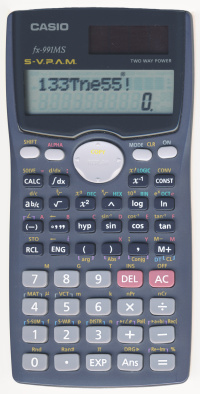
Casio fx-991MS displaying l33tness

Standard tricks

These tricks are just built-in features of the calculator that are not entirely obvious, because the previous generation of scientific calculators did not have these features.

Solve polynomials and linear systems

To solve a quadratic or cubic polynomial equation:
  1. Go to EQN mode and scroll over to the Degree? section (MODE MODE MODE 1 →).
  2. Enter the degree (2 or 3).
  3. Enter the 3 or 4 (real) polynomial coefficients, from highest degree downward.
  4. Scroll up and down through the solution set. Complex-valued solutions are included.
To solve a system of linear equations in 2 or 3 variables:
  1. Go to EQN mode and stay at the Unknowns? section (MODE MODE MODE 1)
  2. Enter the number of variables, which is also the number of equations (2 or 3)
  3. Enter the 6 or 12 coefficients of the system of linear equations.
  4. Scroll up and down through the solution vector.
Polynomials equations and linear systems are frequently occurring problems in mathematics and sciences, which makes this calculator feature one of the most useful ones.

Solve arbitrary equations

To solve an arbitrary equation of one variable:
  1. Enter the equation on the formula line. (e.g., 3X−8=5)
  2. Press SOLVE (SHIFT CALC).
  3. Give an initial guess for the variable and press the equals button. Try to give a value near an actual solution, or else solving will be slow or will fail. (However if the equation is linear, then any initial value works.)
  4. Press SOLVE again (SHIFT CALC). You may need to wait a few seconds.
  5. Read the result. (e.g., X=4.333333333)
The calculator uses a form of Newton’s method (as mentioned in the manual) to solve the equation. The algorithm can easily hang, fail, or give a wrong answer, so beware – it is not an automatic solver for all equations.
Tip: Although linear equations are simple to solve in theory, letting the calculator solve it for you can still save you some algebraic manipulation. Here’s an example problem: The 3 angles in a triangle are AB, and CB is twice of AC is triple ofB. Find the value of B. The solution can be found by solving the equation B÷2+B+3B=180.

Evaluate a function at many points

You can evaluate an arbitrary function (of one or more variables) at different arguments without re-entering the function’s definition repeatedly. Procedure:
  1. Enter the expression defining the function. (e.g. X2+Y)
  2. Press CALC.
  3. For each variable in the expression, give it a value.
  4. Read the value of the evaluated expression.
  5. To evaluate the function at another argument, go to step 2 (not step 1).
For example, this makes it much easier to use the rational root theorem to factor or solve polynomials.

Random number generation

The pseudo-variable Ran# (SHIFT .) gives a uniformly distributed random number in the range [0, 1) with a step size of 0.001. It takes on a random value for each instance in a formula and for each evaluation of a formula. (e.g. Ran#+Ran# has a different distribution than 2Ran#.)
To get an integer in the range [0, N), evaluate N×Ran# and mentally discard the fractional part of the result. This can be useful answering multiple-choice questions, e.g. Go left or go right?.
To get a finer step size, use Ran#+0.001Ran# (step size 10−6) or Ran#+0.001Ran#+0.000001Ran# (step size 10−9).

Degree-minute-second conversion

We inherited the sexagesimal (base-60) system from the Babylonians. While it makes some division problems easier for mental arithmetic, generally speaking decimal fractions are far easier to work with in practice. But for those times when you do need to work in sexagesimal or convert between it and decimal, this calculator comes to the rescue. It supports number input in degree-minute-second format, and can convert to and from decimal format. See the manual for details, or just play around with the °′″ button.
Obviously, this feature is useful for doing calculations with angles expressed in DMS notation. But I think it’s less well known that it helps calculations involving time, too. Don’t you remember that there are 60 minutes in an hour and 60 seconds in a minute? These subdivisions are the same as the DMS scheme.
To illustrate how DMS features can be used to solve time-related problems, I present some example exercises:
  • You arrived at work at 08:42:44 and left at 17:24:59. How long were you present at work?
    Answer: 17°24°59° − 08°42°44°, which yields 8°42°15. This means 8 hours, 42 minutes, and 15 seconds. Pressing the °′″ button swiftly converts this answer to about 8.70 hours.
  • You start driving at 21:30:00 at a speed of 30 m/s, and you need to travel 150 km. At what time will you reach your destination?
    Answer: 21°30° + 150×1000÷30÷3600, which yields 22:53:20 (exact).

Numerical differentiation

The numerical differentiation operation (SHIFT ∫dx) takes 2 or 3 arguments:
  1. The function of X to differentiate
  2. The point where the derivative is evaluated at
  3. The change in X (optional)
For example: d/dx(X^X,0.5) = 0.216976666. (The true value is about 0.216977710.)

Numerical integration

The numerical integration operation (∫dx) takes 3 or 4 arguments:
  1. The function of X to integrate
  2. The lower limit
  3. The upper limit
  4. The amount of partitioning (optional)
If the amount of partitioning is n, then the number of partitions is 2n. See User’s Guide 2 for more details.
Example of usage, while varying the amount of partitioning:
  • ∫(X−1,1,2,1) = 0.7
  • ∫(X−1,1,2,2) = 0.69
  • ∫(X−1,1,2,3) = 0.6932
  • ∫(X−1,1,2,4) = 0.69315
  • ∫(X−1,1,2,5) = 0.693147
  • ∫(X−1,1,2,6) = 0.6931472
  • ∫(X−1,1,2,7) = 0.69314718
  • ∫(X−1,1,2,8) = 0.693147181
  • ∫(X−1,1,2,9) = 0.69314718
The true value is ln 2, approximately 0.693147181.
Warning: Most functions integrate much more slowly and yield more error than this example.

Display and key test

To enter the calculator’s display and key test mode, press and hold SHIFT and 7, then ON. To exit the test at any time, press ON. (Note: Pressing 7 is not necessary on some older versions of this calculator.)
The first phase is the display test. Press SHIFT to step through the sequence of LCD patterns:
  1. All segments on
  2. All segments off
  3. Half of segments on
  4. The other half of segments on
  5. Many copies of a single digit, from 0 to 9
The last display test shows 999999999999. Pressing SHIFTagain starts the second phase, the key test. To complete the test, press every key (except ON) in order from left to right, top to bottom. The number on the screen increments every time you correctly hit the next key in the sequence. Don’t press ONunless you intend to quit!

Iterating formulas

A major difference between this calculator and older scientific calculators is that this calculator does not evaluate the expression while you input it. After you finish entering the expression, you press the equals key (=) and the calculator evaluates the expression all at once.
The most recent expression evaluated can be re-evaluated simply by pressing the equals key. The result of each evaluation is always saved in the answer variable (Ans). For single-statement iterations, it is most convenient to use Ans as the iterated variable. For example, Ans+1 is functionally equivalent but easier to type than X=X+1.
Multi-statement iterations can be written by using colon (ALPHA ∫dx) to separate the statements. When evaluating, press the equals key once per statement, and the calculator evaluates them in sequence. When all the statements in the line have been evaluated, pressing the equals key will go back to evaluating the first statement. For example, A=A+2:B=B−3 is a multi-statement line.
Remember to give initial values to all the variables used in the iterations.

Simple iterations

Arithmetic sequence
For example, starting at 0 and counting up by 1:
  1. Initialize: Evaluate 0 (sets Ans to 0).
  2. Iterate: Evaluate Ans+1.
Geometric sequence
For example, starting at 1 and doubling:
  1. Initialize: Evaluate 1 (sets Ans to 1).
  2. Iterate 2Ans.
Repeated squaring
For example, starting at 1.000000001 and squaring:
  1. Initialize: Evaluate 1.000000001 (sets Ans to 1.000000001).
  2. Iterate Ans2.
(The value overflows after 38 iterations.)
Logistic map
For example, the chaos at r = 4:
  1. Initialize: Evaluate 0.2 (sets Ans to 0.2).
  2. Iterate 4Ans(1−Ans) and watch the randomness.

Newton’s method iteration

To solve an equation of the form f(x) = 0:
  1. Set Ans to an initial value close to a root (solution).
  2. Iterate the expression Ans − f(Ans)/f′(Ans), where f′ is the derivative of f.
For example, to solve x2 − 3 = 0:
  1. Initialize: Evaluate 1000(Ran#−0.5).
  2. Iterate Ans−(Ans2−3)/(2Ans).
After a number of iterations, the result should converge to 1.732050808 or −1.732050808, depending on the initial value.

Fixed point iteration

It is possible to solve equations of the form f(x) = x by simply iterating xnext = f(x).
Examples:
  • Iterating cos Ans, the answer converges to 0.739085133 in radians mode and 0.999847741 in degrees mode.
  • Iterating e−Ans (i.e., eAns), the answer converges to 0.567143290.
Unfortunately, fixed point iteration is generally slower and less reliable than Newton’s method.

Taylor series iterations

We can manually simulate some elementary functions using naïve Taylor series.
Exponential function
  1. Initialize X with the argument of your choice.
  2. Initialize: Y=1A=0C=0
  3. Iterate: A=A+Y : Y=YX÷(C+1) : C=C+1
  4. Read the answer from A.
Cosine function
  1. Initialize X with the argument of your choice.
  2. Initialize: Y=1A=0C=0
  3. Iterate: A=A+Y : Y=−YX2÷(C+1)÷(C+2) : C=C+2
  4. Read the answer from A.
Sine function
  1. Initialize X with the argument of your choice.
  2. Initialize: Y=XA=0C=1
  3. Iterate: A=A+Y : Y=−YX2÷(C+1)÷(C+2) : C=C+2
  4. Read the answer from A.

Fibonacci sequence iteration

Procedure:
  1. Initialize: A=0B=1
  2. Iterate: C=A+B : A=B : B=C

Greatest common divisor iteration

This is based on the original Euclidean algorithm, which uses repeated subtraction rather than the modulus (remainder) operation. The procedure:
  1. Set the mode to complex numbers (MODE 2). (This is needed in order to use the absolute value function.)
  2. Initialize: Set A and B to be the natural numbers whose GCD will be computed.
  3. Iterate: A = A − B (tanh(20A−20B) + Abs tanh(20A−20B)) ÷ 2 : B = B − A (tanh(20B−20A) + Abs tanh(20B−20A)) ÷ 2. (Quite a mouthful, isn’t it?)
  4. When A and B converge to the same number, that number is the GCD answer.
Note that the function f(x) = (tanh(20x) − |tanh(20x)|) / 2 hackily emulates a step function, with f(x) = 0 for x ≤ 0 and f(x) = 1 forx ≥ 1. (This is due to the finite precision and rounding.)
Thanks to Bojan Petrovic for suggesting this trick!

Miscellaneous tricks

l33tsp34k

The calculator contains a palette of symbols, which can be used to spell out words and phrases in l33tsp34k. The complete (Latin) alphabet cannot be spelled out, but this can make the exercise more fun.
LetterCharacterMeaningKey sequence
AAVariable AALPHA (−)
4Digit 44
αFine structure constantCONST 10
BBVariable BALPHA °′″
8Digit 88
CCVariable CALPHA hyp
CCombination functionSHIFT +
DDVariable DALPHA sin
EEVariable EALPHA cos
EE notation separatorEXP
eExponential functionSHIFT ln
eElementary chargeCONST 23
eEuler’s numberALPHA ln
3Digit 33
FFVariable FALPHA tan
FFaraday constantCONST 22
fSI prefix femtoSHIFT 1
GGSI prefix gigaSHIFT 8
GGravitational constantCONST 39
gStandard gravityCONST 35
HhPlanck constantCONST 06
IiImaginary unitENG (only in complex mode)
1Digit 11
KkSI prefix kiloSHIFT 6
kBoltzmann constantCONST 25
L1Digit 11
MMVariable MALPHA M+
MSI prefix megaSHIFT 7
mSI prefix milliSHIFT 5
NnSI prefix nanoSHIFT 3
O0Digit 00
PPPermutation functionSHIFT ×
pSI prefix picoSHIFT 2
RRIdeal gas constantCONST 27
S5Digit 55
TTSI prefix teraSHIFT 9
tCelsius temperatureCONST 38
7Digit 77
UuAtomic mass unitCONST 17
XXVariable XALPHA )
×Times×
YYVariable YALPHA ,
Z2Digit 22
The letters that cannot be represented are J, Q, V, W. Discovering the punctuation that can be entered is left as an exercise for the reader.

Store 80 numbers

In the SD mode, you can store a sequence of up to 80 numbers, which persist even after a power cycle. To store a number, enter a literal number or an expression, then pressing DT (M+). To retrieve the numbers, scroll through the sequence of stored numbers by pressing up or down ().
In theory, any information can be stored as numbers. (Modern digital computers are built completely on this fact.) For example, if you want to store text on the calculator, just devise a coding scheme that maps between letters and numbers. Note that with the precision available, each number on this calculator can hold up to about 40.7 bits of information.

For more detail visit:http://www.nayuki.io